Showing posts with label hack n crack. Show all posts

Monday, July 30, 2012

Hack a wi-fi network with WEP security


1) First we need to scan for available wireless networks.
Theres this great tool for windows to do this.. called “NetStumbler” or Kismet for Windows 
and Linux and KisMac for Mac.
The two most common encryption types are:
1) WEP
2) WAP
WEP i.e Wire Equivalent Privacy is not consideres as safe as WAP 
i.e Wireless Application Protocol.
WEP have many flaws that allows a hacker to crack a WEP key easily.. whereas

WAP is currently the most secure and best option to secure a wi-fi network..
It can’t be easily cracked as WEP because the only way to retreive a WAP key is to use 
a brute-force attack or dictionary atack.
Here I’ll tell you how to Crack WEP
To crack WEP we will be using Live Linux distribution called BackTrack to crack WEP.
BackTrack have lots of preinstalled softwares for this very purpose..
The tools we will be using on Backtrack are:
Kismet – a wireless network detector
airodump – captures packets from a wireless router
aireplay – forges ARP requests
aircrack – decrypts the WEP keys

1) First of all we have to find a wireless access point along with its bssid, essid and 
channel number. To do this we will run kismet by opening up the terminal and typing in 
kismet. It may ask you for the appropriate adapter which in my case is ath0. You can 
see your device’s name by typing in the command iwconfig.


2) To be able to do some of the later things, your wireless adapter must be put into 

monitor mode. Kismet automatically does this and as long as you keep it open, your 
wireless adapter will stay in monitor mode.


3) In kismet you will see the flags Y/N/0. Each one stands for a different type of 

encryption. In our case we will be looking for access points with the WEP encryption. 
Y=WEP N=OPEN 0=OTHER(usually WAP).


4) Once you find an access point, open a text document and paste in the networks 

broadcast name (essid), its mac address (bssid) and its channel number. To get the 
above information, use the arrow keys to select an access point and hit <ENTER> 
to get more information about it.

5) The next step is to start collecting data from the access point with airodump. 

Open up a new terminal and start airodump by typing in the command:
airodump-ng -c [channel#] -w [filename] –bssid [bssid] [device]
In the above command airodump-ng starts the program, the channel of your access 

point goes after -c , the file you wish to output the data goes after -w , and the MAC 
address of the access point goes after –bssid. The command ends with the device 
name. Make sure to leave out the brackets.


6) Leave the above running and open another terminal. Next we will generate some 

fake packets to the target access point so that the speed of the data output will 
increase. Put in the following command:
aireplay-ng -1 0 -a [bssid] -h 00:11:22:33:44:55:66 -e [essid] [device]
In the above command we are using the airplay-ng program. The -1 tells the program 

the specific attack we wish to use which in this case is fake authentication with the 
access point. The 0 cites the delay between attacks, -a is the MAC address of the 
target access point, -h is your wireless adapters MAC address, -e is the name (essid) 
of the target access point, 
and the command ends with the your wireless adapters device name.


7) Now, we will force the target access point to send out a huge amount of packets that 

we will be able to take advantage of by using them to attempt to crack the WEP key. 
Once the following command is executed, check your airodump-ng terminal and you 
should see the ARP packet count to start to increase. The command is:
aireplay-ng -3 -b [bssid] -h 00:11:22:33:44:5:66 [device]
In this command, the -3 tells the program the specific type of attack which in this case is

packet injection, -b is the MAC address of the target access point, -h is your wireless 
adapters MAC address, and the wireless adapter device name goes at the end.
 Once you have collected around 50k-500k packets, you may begin the attempt to break 

the WEP key. The command to begin the cracking process is:
aircrack-ng -a 1 -b [bssid] -n 128 [filename].ivs
In this command the -a 1 forces the program into the WEP attack mode, the -b is the 

targets MAC address, and the -n 128 tells the program the WEP key length. If you don’t 
know the -n , then leave it out. This should crack the WEP key within seconds. The more 
packets you capture, the bigger chance you have of cracking the WEP key.

Thursday, July 26, 2012

Hack remote computer using IP Address


  1. Confirm the website or a computer you want to hack.
  2. Find or trace their IP address.
  3. Make sure that IP address is online
  4. Scan for open ports
  5. Check for venerable ports
  6. access through the port
  7. Brute-force username and password
Now let me describe in brief in merely basic steps that a child can understand it.
First, getting the IP address of victim.
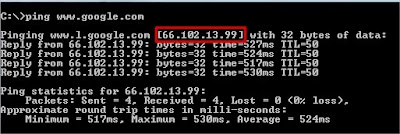
To get the IP address of the victim website, ping for it in command prompt.
For example,
ping www.google.com
will fetch the IP address of Google.com
a How to hack remote computer using IP Address
This is how we can get the IP address of the victims website.
How about your friend’s PC? You can’t do www.yourfirend’sname.com, can you? Finding your friend’s IP address is little tough job, and tougher it is if he has dynamic IP address that keeps changing.
One of the widely used method to detect IP address of your friend is by chatting with him.
 
If u know the ip address? Is it online? To know the online status just ping the IP address, if it is online it will reply.
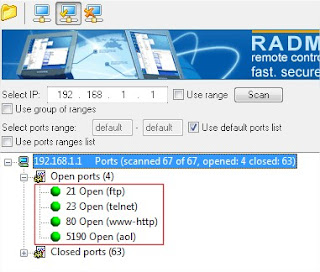
If the IP address is online, scan for the open ports. Open ports are like closed door without locks, you can go inside and outside easily.
Use Advanced Port Scanner to scan all open and venerable ports.
mollel pixels
Now you’ve IP address and open port address of the victim, you can now use telnet to try to access them. Make sure that you’ve telnet enabled in your computer or install it from Control panel > Add remove programs > add windows components.
Now open command prompt and use telnet command to access to the IP address. Use following syntax for connection.
telnet [IP address] [Port]
c How to hack remote computer using IP Address
You’ll be asked to input login information.
d How to hack remote computer using IP Address
If you can guess the informations easily then it’s OK. Or you can use some brute-forcing tools like this one.
In this way you’ll able to hack remove computer using only IP address

Monday, June 11, 2012

Unlock Your Nokia Cell Phone


  STEPS:

1. Before trying anything else, contact your service provider and ask for an unlock code. Usually, if you've been a customer of theirs for some time, they will provide you with an unlock code for free. This is, by far, the best way to get your phone unlocked.

2. Download software to generate the unlocking code. Software is available on some websites for free and some pay websites that also offer support if things go wrong. 


3. Find the Serial number of the cell phone, also known as your IMEI number. This can be done by either removing the back of your cell phone and looking underneath the battery, or simply by typing in *#06# into your cell phone. It should be something like: 010082321439976/07951780736

4. Using the software you have downloaded, enter in your Manufacturer (which is in this case Nokia), and sliding the card out. Put the battery back in and power the phone on.
5. You will see a message "Insert SIM Card". Enter all of the characters you see in your code, including the # symbols. To get a 'p' press * 3 times, to get a '+' press the * key 2 times, to get a 'w' press the * key 4 times. Disregard any spaces in the code.
6. In order to unlock your phone you generally need to enter only one code. Start with the first one. If your phone is not unlocked by typing the first code (MCC+MNC), use code "7" (Multilock)

7. Once you have finished entering a code that works you should see a message that says "SIM is not restricted" or "Restriction off" message depending on your model. If not, try entering another code. Message "Cannot undo restrictions" means the phone is "hard-locked" and cannot be unlocked by code.

For some phones, such as the E51, you may unlock them simply by updating the phone's firmware using the Nokia PC Suite.

Unlocking applies to all cellular phones. The steps provided above work for GSM phones. You CANNOT use the steps above to unlock a CDMA or TDMA phone. To "unlock" a CDMA or TDMA phones is known as reprogramming the phone. For CDMA phones, you need the Master Subsidary Lock or MSL, which you MAY be able to get from your service provider. Please note that you may not be able to get the MSL from your service provider, as it usually is against company policy to give these to customers.

Switch off the phone. Hold the keys "3", "*" and "Call" and switch the phone on. Keep the buttons held down till you see the word "Formatting..." on the screen. Make sure that the battery is full charged before you attempt this. This should reset the phone lock code.
Also some software is able to unlock CDMA,GSM and other phones to different networks but you must watch for the fraud ones
Related Posts Plugin for WordPress, Blogger...